
Introduction
A practical guide to prompting Framer AI Agents, testing the generated site, using skills and branches, and connecting Codex for structured CMS work.
Framer AI Agents can turn a structured brief into a responsive, CMS-backed site, but the strongest workflow is iterative: generate the first version, test the interactions, fix what failed, and keep larger experiments isolated in a branch. For repetitive or file-driven work, an external agent such as Codex can connect directly to the same Framer project.
Build the first version from a structured brief
Open the Agent tab in Framer, start a new chat, and describe the result you want in enough detail for the agent to make layout and content decisions. You can choose a model, select an existing layer to give the agent visual context, and attach source files when the task depends on outside material.
The demonstration asks Framer to create a complete editorial blog rather than a single hero section. Its brief covers the goals, page structure, responsive behavior, CMS collections, search and category filtering, newsletter placement, reusable article pages, SEO, interactions, and explicit limitations. This is the useful pattern: define the system and the expected behavior, not just the visual mood.
Include four kinds of information in a substantial build prompt: (1) the reader outcome, such as discovering articles and moving between related topics; (2) the content model, including collections, fields, categories, authors, and article relationships; (3) the required views and breakpoints, including desktop, tablet, and mobile; and (4) the behaviors that must actually work, such as navigation, search, filtering, and detail-page links.
The agent can then plan the work and create the page structure, reusable components, responsive variants, and CMS-ready content. A detailed prompt does not remove the need for review; it makes that review concrete.
Test the generated site before refining the design
The first generated blog in the video looked complete, but several important interactions were not working: navigation did not lead to the expected pages, category controls did not filter the articles, and search was incomplete. The creator responded with a focused second instruction to add the missing detail pages and repair the search and category behavior.
That iteration is the practical lesson. Test the generated site as a visitor would: open an article card and confirm it reaches a CMS detail page; use every category control and confirm the visible collection changes; search for a known title and verify that the correct article remains; and check the desktop, tablet, and mobile layouts independently.
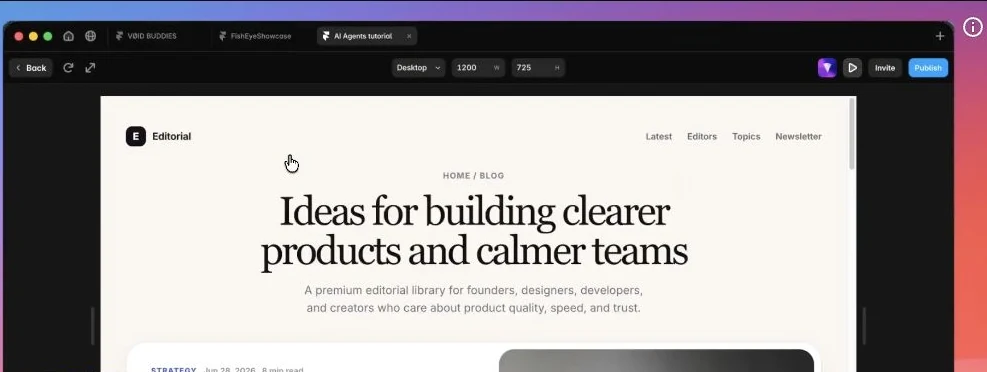
After the second pass, the demonstration had a usable blog homepage, reusable article pages, CMS collections for categories, authors, topics, and articles, plus working search and filters. The important distinction is that the agent accelerated the repetitive setup; the creator still supplied the acceptance criteria.
Use Agent Skills for repetitive work
Framer’s skill selector lets you specialize the native agent for tasks such as responsive breakpoints, CMS work, component variants, code components, and design review. Choose the skill that matches the job before you send the prompt so the agent receives the relevant Framer-specific operating instructions.
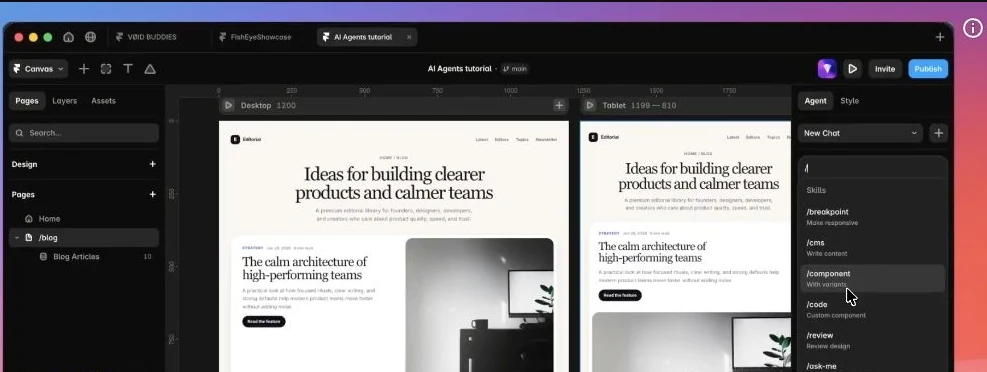
The video demonstrates why this matters with a bulk CMS scenario: upload a CSV containing 20 items, ask the agent to map its columns to the existing collection, preserve the site’s visual style, and choose suitable images. That kind of structured, repeated operation is a better fit for an agent than manually creating every item.
Give the agent explicit mapping rules when fields are ambiguous, and review a sample before trusting a large import. AI is most valuable here as an execution layer for a well-defined content model, not as a substitute for deciding what the model should be.
Keep AI changes isolated with branches
Branches provide a safe place to test changes without affecting the main project. Framer’s June 2026 documentation describes a branch as an isolated copy of the project: you can edit canvas content, CMS items, text, page structure, and AI-generated work, then review and apply the changes to main. Applying a branch does not publish the live site; main still needs to be published separately.
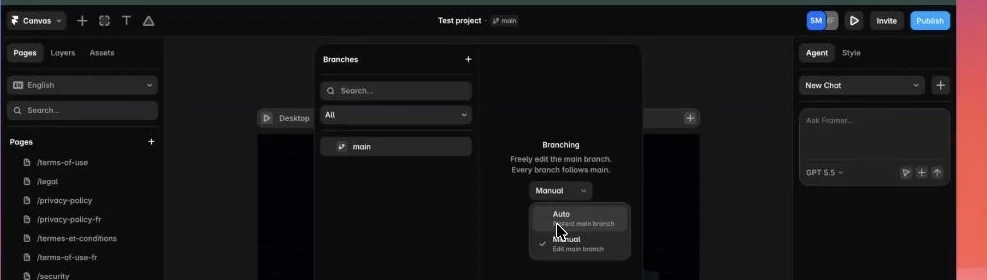
The video shows two modes: Auto creates a branch for agent work so changes can be reviewed separately; Manual lets the agent edit the active branch directly. Use automatic branching for broad generation, CMS imports, or any change that may touch several pages. Manual mode is better reserved for small, well-scoped edits where you already understand the affected nodes. Framer’s plan availability can change, so confirm branch access in your workspace before making it a dependency in your publishing process.
Connect Codex as an external Framer agent
An external agent is useful when the work begins outside Framer: local Markdown, CSV or JSON files, scripts, APIs, translation files, or a reusable skill such as this YouTube-to-blog workflow. Framer officially supports Codex and other local agent harnesses for structured project work.
The setup screen shown in the video asks for Node.js 24 or newer. Verify the installed version first:
Then install the Framer agent skills:
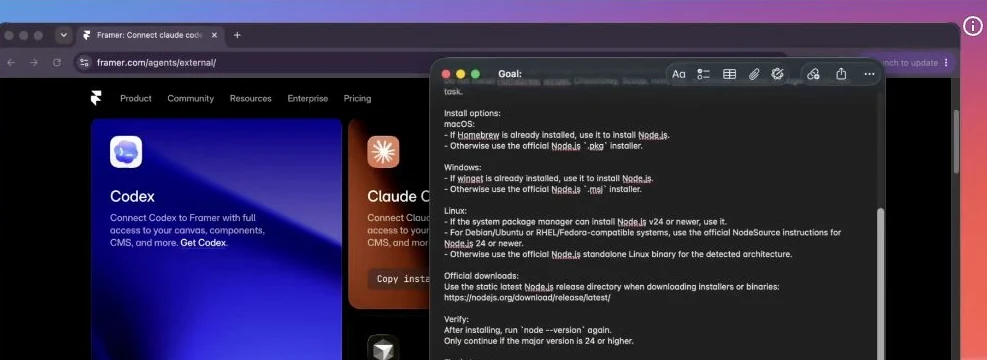
After setup, give Codex the Framer project link and ask it to inspect or update a clearly defined part of the project. The first connection opens a browser approval flow. Review the requested project before granting access.
Framer’s help documentation, updated June 24, 2026, says external agents work especially well for CMS items, localizations, redirects, repeated content changes, and structured design updates. It also lists three limitations: external agents cannot update some project settings such as project names and domains, assign overrides to nodes, or access analytics data. Treat those as product boundaries rather than prompt failures.
The native Framer Agent remains the most direct option for visual work on the canvas. Codex becomes more valuable when the job combines Framer with local files, reusable processes, code, or external data. In both cases, the reliable pattern is the same: define the outcome, make the change in a reviewable scope, test the behavior, and publish only after verification.